TurboGear: Profile-driven game mode manager for distraction-free mobile play
Try TurboGear - Game Mode Manager from MinsapCorp to reduce interruptions and set consistent device behavior for mobile gaming. It acts as a hub that applies saved environment profiles to adjust brightness, mute notifications via Do Not Disturb, and set media and system volumes automatically when a session starts. Presets, optional background-task pausing for resource use, quick profile application, and write-settings brightness control are exposed in the interface. Mobile gamers who want fewer interruptions and predictable device behavior gain direct control during play.
What does TurboGear do?
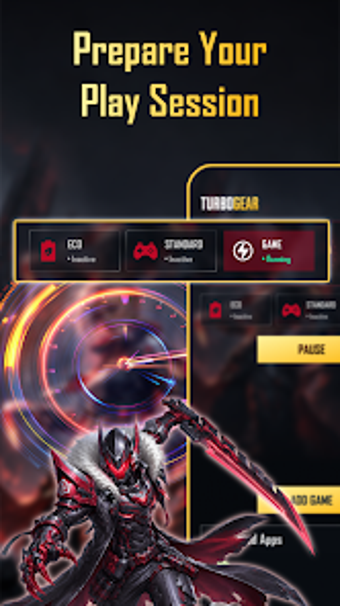
TurboGear functions as a local game-mode manager that applies saved environment profiles when a play session starts. In practice, it exposes profile presets that set screen illumination, media and system volumes, and enforces notification silence via the system Do Not Disturb policy. Core capabilities:
- Profile activation for display and sound
- Distraction blocking using system DND
- Preset selection before launch
Does it slow down your system during a session?
The app includes an optional Resource Prep mode that attempts to pause non-essential background tasks to free CPU and memory, a behavior whose effectiveness varies with device hardware and OS version. Moreover, the tool avoids writing to kernels or application binaries; the developer explicitly does not modify core system files, which reduces the chance of deep system interference while the app is active.
Is it safe to use on a production device?
Safety relies on standard Android permissions: Do Not Disturb access to silence alerts and Write Settings to change brightness and volume. The app does not auto-reject incoming calls, so call audio remains governed by system behavior. In addition, the optional resource step requires explicit permission, so users must grant those controls before the manager can alter background tasks at session start.
Do I need technical knowledge to configure profiles?
Casual players can apply preset modes from the interface without deep setup; presets cover common brightness and volume combinations. Nevertheless, advanced users can fine-tune individual levels and enable the optional background-task pause for extra resource focus. The developer exposes these controls plainly so the workflow supports quick selection prior to launching a game, while still allowing manual adjustments for power users.
Practical recommendation and final assessment
TurboGear is a pragmatic choice for mobile players who want predictable device behavior during play; it centralizes session controls and limits intrusive alerts. The main caveat is that resource-priority attempts vary by hardware and OS, so measurable gains are not assured on every device. Test each profile in a short session before relying on it in competitive matches to confirm how it performs on your hardware.